Here's a Tebex description for sc_timeclock:
⏱ Timeclock — Advanced Employee Time Tracking for QBX/QBCore
Track, manage, and report employee hours automatically across all your server's jobs — no manual logging required.
Timeclock is a fully-featured employee time tracking system built natively for QBX/QBCore with ps-multijob support. It automatically clocks employees in and out based on duty state, handles disconnects gracefully, and gives bosses a powerful in-game management suite backed by Discord webhook reporting.
🔧 Core Features
- Automatic clock in/out on duty toggle, job swap, login and logout — no manual interaction needed
- ox_target clock-in/out zones configurable per job, visible to all players with contextual options based on employment
- Full session tracking with per-session duration, weekly totals, all-time totals, and job playtime
- Disconnect protection — open sessions are automatically closed and logged if a player crashes or force-quits
- Multi-job support via ps-multijob, qbx_multijob, and qbx_core's built-in multijob system
-
Boss grade detection via
qbx_core:IsGradeBoss— no manual grade config required
👔 Boss Management Menu
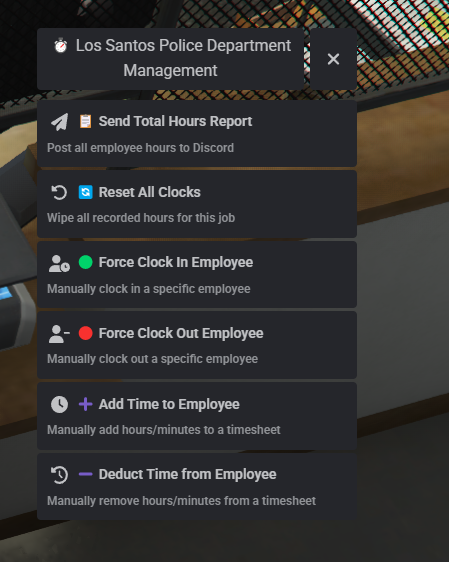
Bosses access a full management suite directly in-game via /managetimesheet or the ox_target zone:
- 📋 Send Hours Report — posts a full Discord embed with every employee's weekly hours, total hours, playtime, and current duty status
- 🟢 Force Clock In — manually clock in a specific employee
- 🔴 Force Clock Out — manually clock out a specific employee
- ➕ Add Time — manually add hours/minutes to an employee's timesheet
- ➖ Deduct Time — remove hours/minutes from an employee's timesheet
- 🔄 Reset All Clocks — wipe all recorded hours for the job (with confirmation)
🛡️ Admin Tools
-
/timesheet [job]— admin command to open the management menu for any configured job (requires ace permission) -
/timecheck [id]— boss command to check any online player's clock status across all shared jobs -
generatereports— server console command to fire the full hours report for every configured job at once - Full ace permission support (
admin) for granular access control
📡 Discord Integration
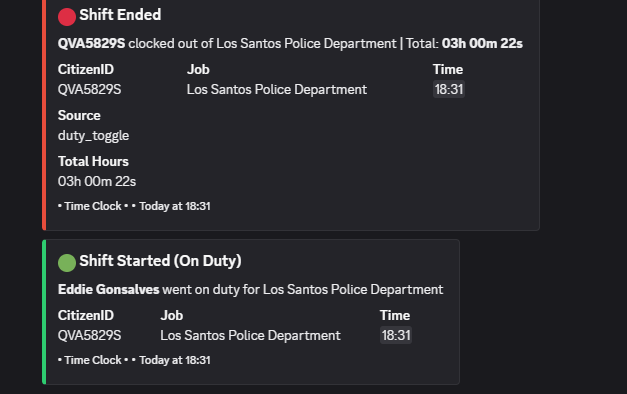
Every clock event fires a rich Discord embed to a configurable per-job webhook:
- 🟢 Shift Started / Resumed
- 🔴 Shift Ended / Auto-Ended
- 🔄 Job Swap clock in/out
- 🟣 Force clock in/out
- ➕➖ Time adjustments
- 📋 Full hours reports with weekly, total, and playtime breakdowns
📬 Mail Integration
Automatic in-game mail notifications on:
- Clock out (with total hours)
- Auto clock-out on disconnect
- Force clock-out by management
- Time adjustments (add/deduct)
🔌 Developer Exports
Full server-side export API for integration with other resources:
lua
exports['stimeclock']:ClockIn(citizenid, job, forcedBy)
exports['timeclock']:ClockOut(citizenid, job, forcedBy)
exports['timeclock']:IsClockedIn(citizenid, job)
exports['timeclock']:GetTotalSeconds(citizenid, job)
exports['timeclock']:GetWeeklySeconds(citizenid, job)
exports['timeclock']:GetPlayerStatus(citizenid)
exports['timeclock']:AddTime(citizenid, job, seconds, addedBy)
exports['timeclock']:DeductTime(citizenid, job, seconds, deductedBy)
exports['timeclock']:ResetClocks(job, resetBy)
exports['timeclock']:GetEmployees(job)
exports['timeclock']:CloseOpenSessions(citizenid)
📦 Dependencies
- qbx_core
- ox_lib
- ox_target
- oxmysql
- ps-multijob (optional)
⚙️ Configuration
Simple config file covering:
- Per-job clock-in/out coords, webhook URL, and label
- Multijob table/column names
- Mail resource and sender names
- Discord embed colours
- Debug mode toggle